How to Protect Yourself?
Security is one of those things that we all hear about and think it is a good thing, but then we tend to let someone else worry about it. Although FAU has taken many steps to make its data and network secure, you need to be aware that what you do online can put you, or at least your computer, at risk. A little bit of forethought on your part can go a very long way in ensuring your security is not compromised.
Note: FAU will never send you an email asking you to verify personal information with your password or Social Security Number. Nor will they ask you to reset your account via e-mail link.
How Can I Protect Myself?
The best way to protect your computer is with antivirus software. To continue the biological analogy, antivirus software works similarly to a flu shot – it recognizes the virus and keeps it from infecting your machine. And just as flu vaccines have to be reformulated every year because the flu virus mutates, antivirus softwares have to be updated routinely because the computer viruses are constantly being changed or reinvented. The antivirus software stores virus definitions (ways to recognize the viruses), so you routinely need to update your antivirus definitions.
If you have any questions about antivirus software, contact your College computing consultant or the OIT Help Desk.
Computer Viruses
Like biological viruses, computer viruses are programs that can replicate themselves, spread from one computer (or body) to another, and generally cause problems. Today, there are various types of programs that spread among computers, and they are collectively called "malware" (malicious software).
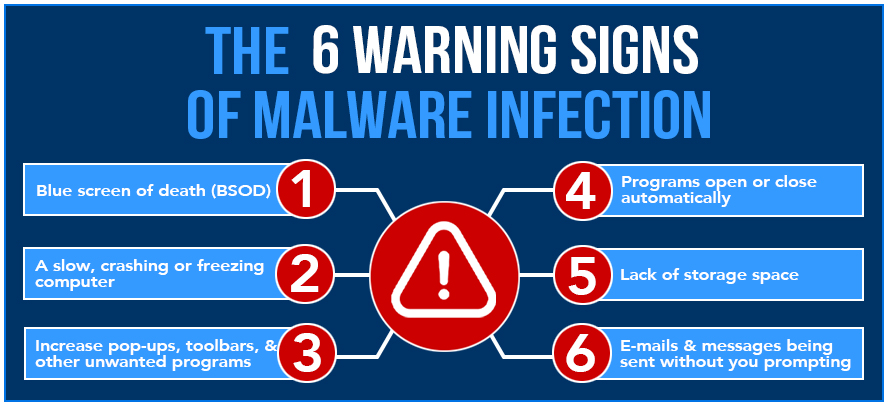
Depending on the form of malware, the damage can be just annoying (lots of pop-up ads, or otherwise slowing the performance of your computer) to downright disastrous (causing you to reformat a hard drive). If your computer starts acting "strangely," then you might have a low level virus. Regardless of the level of damage, it's worth protecting your computer from viruses. One of the worst things about viruses is that, if you have one, you can unknowingly spread it to other people's computers.
How Do I Get the Viruses?
These days most viruses travel through the Internet, primarily by e-mail. The best rule of thumb is not to accept attachments that you are not expecting or don't know about. So many jokes travel via e-mail, many of them by attachment. Why risk it? At FAU, we have virus scanners on the e-mail servers that analyze attachments for viruses. If an attachment is found to contain a virus, the attachment is removed from the e-mail message; you still get the e-mail, but there will be a notice that an attachment was removed.
Types of Malware
Viruses: Often embedded in e-mail messages as attachments. When you open the attachment, the virus program is activated and goes to work. Consequently, do not open attachments you are not expecting or that are from someone you don't know very well or you don't know why they are sending you the attachment.
Worms: Similar to viruses but don't need a host file to spread. Worms typically use a vulnerability in a computing system or some other method to trick users into starting them.
Trojan (Trojan Horse): As the name suggests, a Trojan Horse is something that appears harmless, even good, but contains something malicious and dangerous. Unlike viruses and worms, Trojan Horses don't replicate. They can be attached to legitimate software or spyware, so you don't know they are there. A common result of Trojans is a lot of adware/spyware that causes many pop-ups and ultimately makes it near impossible to use a Web browser.
Spyware: Software that watches how you use your computer and sends the information to whoever is collecting it. Adware, which watches what sites you go to and what you do on them, is a kind of spyware. Although spyware doesn't necessarily corrupt your computer, its activity can hurt your computer's performance (for example, Windows might open more slowly than usual).
Exploit: Software that takes advantage of known security vulnerability. One way to protect yourself from exploits it to keep current with patches for your operating system (Microsoft sends out new service packs when security vulnerabilities or exploits are found).
Key Logger: Records all key strokes to a file that is then sent to the hacker. Key loggers are dangerous because they can record login and password or other sensitive information (such as credit card numbers). With that information, a hacker can do a lot of damage.
General Security Guidelines
What you should do?
- Keep your antivirus and operating system up to date.
- Contact us if you receive a phishing e-mail. If you are not sure if an e-mail is legitimate, forward it to us and we will assist.
- Set a strong password (uppercase letters, lowercase letters, numbers, and/or special characters make a password stronger).
- Always do your best to protect your identity and all Personal Identifiable Information (PII).
- Use anti-virus software to protect your computer from viruses and other harmful programs (known as malware).
- Use pop-up blockers in your Web browser to help protect yourself from spyware (be sure to allow pop-ups from FAU Web pages since MyFAU and Canvas use them).
- Safe spyware software that you may want to use at no charge are: Malwarebytes Ad-Aware
What you should NOT do?
- Never give out personal information (Social Security number, birthday, driver's license number, any account number or password, etc.) to anyone who asks for it online, especially via e-mail. It is very easy for people to send an e-mail that appears to be from FAU OIT staff, a bank or other institution as a means of obtaining sensitive information. This kind of activity is called phishing.
- Do not click on links or any attachments in any suspicious e-mail.
- Never put your personal information, even your birthday, on any online site, such as Facebook or Twitter.
- Never make your password the word "password" or any other easily guessed words. These are the first keywords that a hacker will attempt to use.
- Never give your passwords to anyone or allow someone to log in to your account. You could be held accountable if someone else's malicious activity is linked to you.
- Never write your password and leave it in a place where someone will find it (such as taped to the bottom of your keyboard, computer, or monitor).
Phishing E-mails
Phishing is the act of disguising as a trustworthy entity (such as an administrative figure from a school, financial institution, etc.) to gather information that could be used to compromise one's identity, school credentials, and/or banking information. One of the most common phishing processes is through e-mail.
You may receive e-mails from FAU and other credible institutions on a daily basis, but you should always question every e-mail's legitimacy before clicking on any links or attachments. It is best practice to delete an unsolicited e-mail if you are unsure of its validity.
Common Red Flags:
- Unfamiliar Sender – The email comes from an unknown or unexpected source.
- Poor Spelling and Grammar – The message contains grammatical mistakes, which is uncommon in professional emails.
- Requests for Personal Information – The email asks for sensitive data like banking information.
- Unexpected Attachment – There is an attachment that was not anticipated, which could contain malware.
- Generic Greeting or Lack of Personalization – The sender does not address the recipient by name.
- Urgent or Emotional Request – The email pressures the recipient to send money quickly, often using an emotional story.
If the e-mail is especially concerning and you need to know if it is an attempted phishing attempt, you can forward the e-mail in question to security@fau.edu and we will assist you in making this decision. In the event that you accidentally click on any links or attachments in a phishing e-mail, it is best to, at the very least, change your FAU password (as well as any other sensitive accounts that use this same password).
Mobile Device Safety
Did you know that Internet usage on mobile devices has surpassed the usage on desktops? It's true, and now it is more important than ever to take precautions against threats on our mobile phones and tablets. Here are a few things you can do to better protect yourself while using your portable devices:
- Set up a passcode/password on the device (touch authentication and/or two-factor should be set up as an added layer of security)
- Make sure you keep up with software updates within your settings and keep up with application updates within your app store.
- Not all apps in the Apple App Store/Google Play Store are safe. Check reviews and do your research to verify the legitimacy of an application.
- Delete applications that you no longer use. Old applications could provide a backdoor to your device.
- Do not access sensitive information such as banking details and emails on public WiFi hotspots.
- Disable WiFi, Bluetooth, and location services when not in use.
Other Resources

Spyware
Like viruses and other malware, spyware is at best annoying, and at worst malicious. Spyware is software that you unknowingly install when you download and install other software. For example, if you install some kind of weather or news feed to your computer, it’s possible that the application has inside it some kind of spyware that isn’t mentioned in the license and use agreement. Spyware can cause serious problems, compromising your computer’s security and potentially sending sensitive information, such as passwords or credit card numbers, to the spyware’s creator.
One of the most common forms of spyware is adware, advertising software that will either run in the program window itself or in pop-up windows. These advertisements are usually for legitimate products, but they can still be annoying if not intrusive. They can track the Web sites you visit and then send that info back to the advertiser. Some people might defend the practice as market research, but the activity can interfere with your computer’s performance, especially if it gets to the point that you have so many pop-up windows opening that you can’t effectively use your computer.
The good news is that there are several software applications that detect and remove spyware and other malicious programs from your computer. You can safely download these from the Internet at no charge:
Signs that Spyware Might Be on Your Computer
- You are bombarded with pop-up ads, especially if you get pop-up ads when you’re not browsing the Web, or when you first turn on your computer.
- Your Web browser settings have changed, and you didn’t change them or you can’t change them back. For example, when you open your Web browser it uses something other than what you had set as its home page.
- Your Web browser now has new components or options in its menus or toolbars. If you have spyware it’s also likely that even if you remove the toolbars they’ll reappear the next time you start your Web browser or restart your computer.
- Your computer seems to be running slowly and gets slower all the time. Spyware works without you seeing it, while using your computer’s memory and processing resources, so it can slow down your machine. In addition to the machine running more slowly, you might notice some programs crashing (just quit working) often, or more often than normal.